AI Workflow Automation: A Complete Guide for Businesses
Published on November 19, 2026 by sanaullah7867@gmail.com
Running a business involves managing many activities at the same time. From handling customer enquiries and managing sales to processing documents, updating records and coordinating teams, everyday tasks can take up valuable time.
Many businesses still depend on manual processes. Employees often move information between different applications, respond to similar customer questions and complete repetitive administrative work.
These activities can slow down operations, increase the possibility of errors and reduce the time available for important business decisions.
This is where AI workflow automation can make a difference.
By combining Artificial Intelligence (AI), automation platforms, APIs and connected business applications, companies can create intelligent workflows that handle repetitive tasks, process information and coordinate activities with less manual effort.
Instead of managing every application separately, businesses can connect their systems and create smoother processes.
For example, when a customer submits an enquiry through a website, an AI-powered workflow can understand the request, identify the required service, create a CRM record, notify the sales team and prepare a relevant response.
In this guide, we will explain what AI workflow automation is, how it works, its benefits, practical business applications, popular tools, implementation steps, common mistakes and ways to measure its success.
What Is AI Workflow Automation?
AI workflow automation is the use of artificial intelligence within automated business processes to understand information, support decisions and perform tasks across connected applications.
Traditional automation follows fixed instructions. For example, it can send an email whenever someone submits a website form.
AI workflow automation can go further. It can interpret customer messages, classify enquiries, extract information from documents, generate summaries and recommend suitable next steps.
Consider a business that receives enquiries through its website.
Without automation, an employee may need to:
Open the enquiry email.
Read the customer’s requirements.
Identify the requested service.
Copy customer details into a CRM.
Assign the enquiry to a sales representative.
Prepare a response.
Create a follow-up reminder.
With an AI-powered workflow, many of these steps can happen automatically.
The system can understand the enquiry, organise the information and perform approved actions through connected applications.
The main goal of AI workflow automation is to reduce repetitive work, improve consistency and help businesses manage their operations more efficiently.
AI Automation vs Traditional Workflow Automation
Both technologies help reduce manual work, but they handle information differently.
Feature
Traditional Automation
AI Workflow Automation
Process execution
Fixed instructions
Rules combined with AI
Data processing
Mainly structured data
Structured and unstructured data
Decision-making
Predefined conditions
Context-based interpretation and recommendations
Content generation
Limited
Can generate text and summaries
Adaptability
Usually needs rule changes
Can interpret different inputs within defined limits
Common applications
Notifications and data transfers
Lead classification, document analysis and intelligent routing
For example, traditional automation can send an acknowledgement email after a website form submission.
AI workflow automation can also understand the customer’s requirements, classify the enquiry, prepare a relevant response and assign the lead to the correct team.
The two approaches are not competitors. Many effective business systems use traditional automation for predictable tasks and AI for activities that require language understanding or information analysis.
How Does AI Workflow Automation Work?
AI workflow automation connects different technologies to collect information, process it and perform actions.
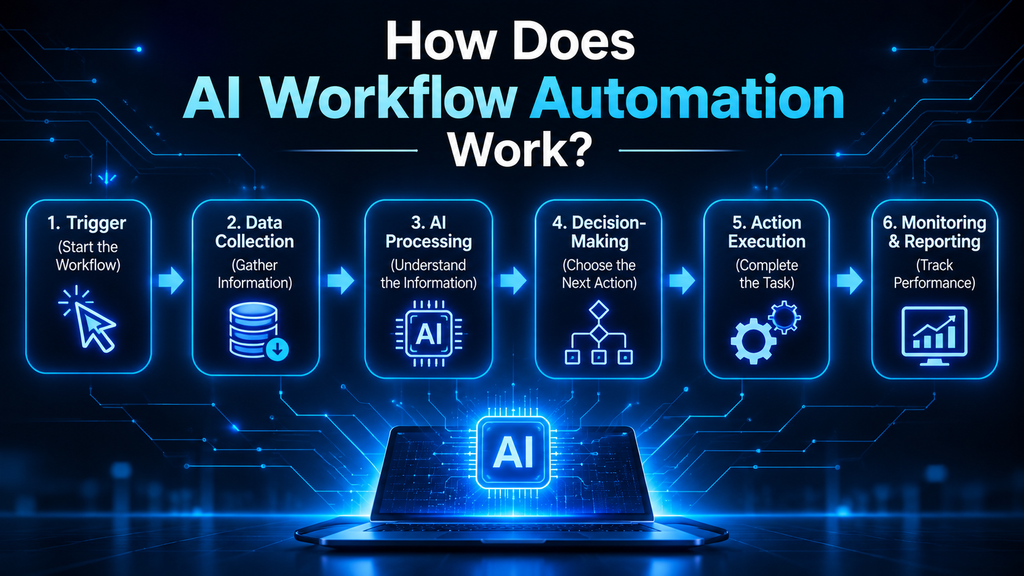
A typical workflow follows six stages.
1. Trigger: Start the Workflow
A trigger is an event that starts an automated process.
Common triggers include:
A customer submitting a website form.
A new email arriving.
A payment being completed.
A new CRM record being created.
A customer sending a WhatsApp message.
An employee uploading a document.
A new order being placed.
For example, a website enquiry can automatically start a lead management workflow.
2. Data Collection: Gather Information
The system collects the required information from connected applications, websites, databases or communication channels.
A website enquiry may contain:
Customer name.
Email address.
Phone number.
Required service.
Project details.
Estimated budget.
The workflow collects the information needed for the next steps.
3. AI Processing: Understand the Information
The AI model processes the collected data and performs tasks such as:
Understanding customer intent.
Extracting important details.
Classifying enquiries.
Summarising documents.
Preparing content drafts.
Analysing customer feedback.
Identifying patterns in business information.
For example, AI can identify whether a customer is asking about website development, SEO services or ecommerce solutions.
4. Decision-Making: Choose the Next Action
The workflow uses predefined business rules, AI-generated recommendations or a combination of both to decide what should happen next.
For example:
A high-priority enquiry can be assigned to a senior sales representative.
A general enquiry can enter a standard follow-up process.
An incomplete enquiry can be sent for manual review.
A support request can be assigned to the relevant department.
Important business decisions should have suitable human approval where required.
5. Action Execution: Complete the Task
The system performs approved activities through connected applications and APIs.
These actions may include:
Updating a CRM.
Sending an email.
Creating a support ticket.
Scheduling a meeting.
Updating a database.
Sending an approved customer notification.
Generating a report.
6. Monitoring and Reporting: Track Performance
The final stage is monitoring the workflow.
Businesses should track completed tasks, failed actions, incorrect outputs and processes that need human attention.
This helps teams identify problems and improve automation over time.
Example: A Complete AI-Powered Lead Management Workflow
A business can connect its website, AI model, CRM, email platform and calendar.
The process could look like this:
A potential customer submits an enquiry.
The workflow collects the customer’s information.
AI identifies the service and understands the requirements.
The system categorises the enquiry.
A CRM record is created or updated.
The relevant sales representative receives a notification.
A suitable response is prepared for approval.
A follow-up task is created.
This is how multiple business activities can work together through one connected workflow.
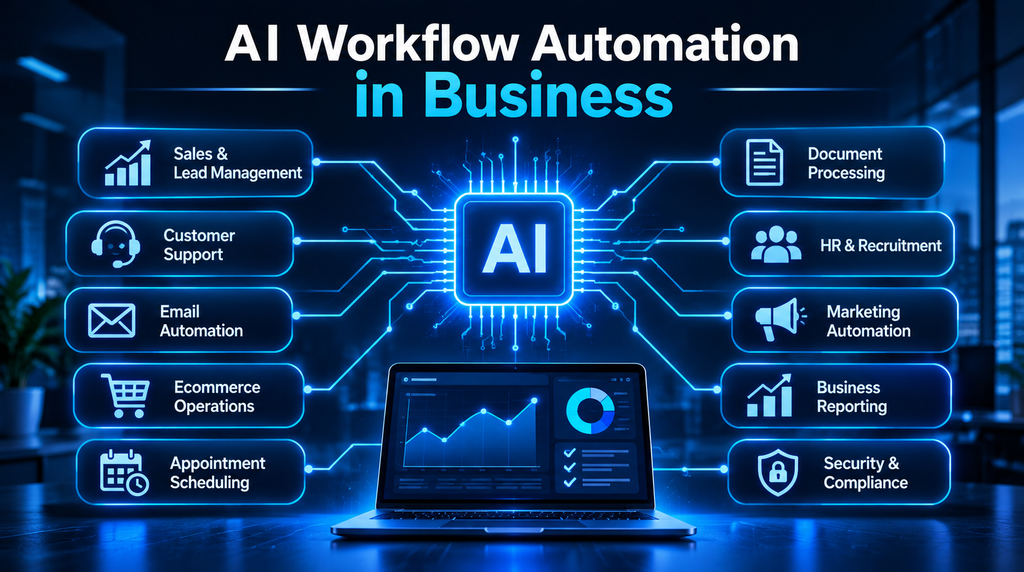
10 Practical Applications of AI Workflow Automation in Business
AI workflow automation can support different departments. The right applications depend on the company’s requirements, existing software and business processes.
Here are ten practical examples.
1. AI-Powered Lead Generation and Sales Automation
Sales teams spend considerable time collecting leads, updating CRM records, understanding customer requirements and following up with prospects.
AI automation can simplify these activities.
A sales workflow can:
Capture leads from websites and advertising campaigns.
Analyse customer requirements.
Categorise enquiries by product or service.
Assign lead priority using defined criteria.
Create or update CRM records.
Prepare personalised follow-up drafts.
Notify sales representatives.
Create reminders for future communication.
For example, a website development company may receive enquiries for business websites, ecommerce stores and website redesigns.
AI can identify the type of project and send each enquiry to the appropriate team.
This helps sales employees spend more time communicating with potential customers and less time performing repetitive administrative work.
2. AI-Powered Customer Support Automation
Customer support teams often receive similar questions about pricing, services, delivery, bookings and account information.
AI automation can help manage these interactions through chatbots and connected support workflows.
A typical process can:
Receive a customer question.
Identify the customer’s intent.
Search an approved knowledge base.
Prepare a relevant response.
Create a support ticket when required.
Assign complex requests to a human representative.
For example, a customer asking about website maintenance can receive information from an approved service document.
However, complaints, sensitive requests and complex problems should be transferred to a human support representative.
3. WhatsApp Business Automation
WhatsApp is an important customer communication channel for many businesses.
By connecting the WhatsApp Business Platform with approved integrations and AI tools, companies can manage customer conversations more efficiently.
Possible workflows include:
Automated enquiry responses.
Product and service information.
Lead qualification.
Appointment reminders.
Order notifications.
Customer feedback collection.
Sales follow-up sequences.
For example, when someone asks about a service through WhatsApp, an AI workflow can identify the request, collect basic information and create a CRM record.
Businesses should use approved integrations, follow WhatsApp messaging policies and obtain the required customer consent.
4. Email Management and Automation
Businesses receive many emails every day. These may include customer enquiries, quotation requests, invoices, project updates and internal communication.
AI can help classify incoming emails, extract important details, prepare summaries and route messages to the right department.
For example, an AI-powered email workflow can:
Identify a quotation request.
Extract the customer’s requirements.
Create a CRM entry.
Notify the sales team.
Prepare a draft response for approval.
This can help employees manage large volumes of email without manually organising every message.
5. Document Processing and Data Extraction
Many organisations still process invoices, purchase orders, application forms, contracts and business reports manually.
AI-powered document processing can extract relevant information and transfer it into connected business applications.
Common applications include:
Invoice data extraction.
Document classification.
Form processing.
Contract summarisation.
Information validation.
Report preparation.
For example, a business can use document automation to extract invoice numbers, dates and amounts before transferring the information to an accounting system.
Financial and legal documents require proper verification and approval. AI-generated information should not be accepted without checking its accuracy.
6. Ecommerce Workflow Automation
Online businesses manage several activities, including product enquiries, order processing, inventory updates, customer communication and returns.
AI workflow automation can help coordinate these operations.
Examples include:
Customer enquiry classification.
Product recommendation assistance.
Order status communication.
Inventory alerts.
Customer review analysis.
Return request routing.
Support ticket creation.
Product information organisation.
For example, when a customer asks about an order, an integrated workflow can retrieve the order status from the ecommerce platform and prepare a response using the latest available information.
Accurate results depend on reliable connections with the ecommerce platform and inventory system.
7. HR and Recruitment Automation
Recruitment involves receiving applications, reviewing candidate information, scheduling interviews and communicating with applicants.
AI automation can support these activities by:
Organising incoming applications.
Extracting information from resumes.
Grouping applications against job requirements.
Preparing interview scheduling messages.
Sending application status updates.
Creating recruitment reports.
AI should assist recruitment teams rather than make unreviewed hiring decisions.
Candidate evaluation must remain fair, explainable and subject to human oversight.
8. Marketing Workflow Automation
Marketing teams manage campaigns, content, social media, customer data and performance reports.
AI can help automate repetitive marketing activities.
For example, a marketing workflow can:
Generate content drafts.
Organise content calendars.
Categorise marketing enquiries.
Prepare campaign summaries.
Analyse customer feedback.
Create performance reports.
Segment audiences using approved data.
A business can also connect its website forms, CRM and email marketing platform to manage new enquiries more effectively.
Human review remains important for brand voice, factual accuracy and content quality.
For businesses looking to improve their online visibility alongside automation, HNK Media also provides SEO, content and digital marketing services that support a stronger digital presence.
9. Appointment and Meeting Automation
Businesses that depend on consultations, demonstrations and customer meetings can use AI-powered workflows to simplify scheduling.
A connected system can:
Receive an appointment request.
Check calendar availability.
Suggest suitable time slots.
Create a meeting after confirmation.
Send a confirmation message.
Schedule reminders.
Update the CRM.
This reduces manual coordination and helps businesses manage appointments more efficiently.
10. Business Reporting and Data Analysis
Managers often need information from different systems to understand business performance.
AI workflow automation can collect information from connected platforms and prepare structured summaries.
Examples include:
Weekly sales reports.
Lead conversion summaries.
Marketing campaign reports.
Customer support performance.
Operational activity reports.
Inventory summaries.
For example, a business can collect sales and lead data from its CRM and marketing platforms to prepare a weekly performance summary.
AI-generated insights should always be checked against reliable source data before important business decisions are made.
Best AI Workflow Automation Tools for Businesses
There are several automation platforms and AI technologies available. Each tool serves different business requirements.
The right choice depends on workflow complexity, technical skills, existing applications, security requirements and budget.
Tool
Main purpose
Suitable use
Zapier
Connects applications and automates workflows
Simple and multi-step business automation
Make
Visual workflow automation
Connecting applications and building complex scenarios
n8n
Flexible workflow automation
Custom integrations and advanced workflows
Microsoft Power Automate
Business application automation
Microsoft 365 and enterprise workflows
HubSpot
CRM and marketing automation
Lead management and customer communication
Salesforce
Enterprise CRM and automation
Sales and customer management
Zoho CRM
Customer management and sales automation
Small and growing businesses
OpenAI API
Adds AI capabilities to applications
Text processing, classification and custom AI workflows
Google Gemini API
AI-powered application integration
Information processing and AI features
LangChain
Framework for building language-model applications
Custom AI applications and connected workflows
Which AI Automation Tool Should a Business Choose?
There is no single tool that works best for every company.
Consider these general requirements:
Small businesses: Start with simple application integrations and workflows that reduce repetitive tasks.
Marketing teams: Consider platforms that connect forms, CRM systems, email marketing and reporting tools.
Growing companies: Evaluate flexible workflow platforms that support multiple applications and more complex processes.
Microsoft-based organisations: Explore Power Automate for workflows involving Microsoft business applications.
Businesses needing custom AI systems: Consider API-based development and flexible workflow platforms.
Before selecting a platform, review its pricing, integration options, usage limits, data handling policies and maintenance requirements.
How to Build an AI Workflow Automation System for Your Business
Successful automation starts with understanding business requirements. Buying software before identifying the actual problem can lead to unnecessary costs and complicated systems.
Follow these steps to plan a practical automation system.
Step 1: Identify Repetitive Business Tasks
Review your daily operations and identify activities that consume time but follow predictable patterns.
Examples include:
Data entry.
Enquiry management.
Email classification.
Appointment scheduling.
Document processing.
Report preparation.
Start with processes that have clear inputs, outputs and measurable business value.
Step 2: Map Your Existing Workflow
Document how the current process works.
Identify:
Where information enters the system.
Which employees handle each activity.
What decisions are required.
Which applications are involved.
Where delays or errors occur.
Which steps need human approval.
This creates a clear foundation for automation.
Step 3: Select the Right Automation Tools
Choose suitable platforms based on your business requirements.
Consider:
Compatibility with existing software.
API availability.
AI model capabilities.
Data security.
Integration costs.
Maintenance requirements.
Scalability.
Avoid choosing tools only because they are popular. The platform should solve a real business problem.
Step 4: Design the Automation Workflow
Create a workflow diagram that explains how the system will operate.
Include triggers, data collection, AI processing, decision points, connected applications and final actions.
Also define which tasks the system can complete independently and which require human approval.
Step 5: Integrate Your Business Applications
Connect the required systems using APIs, webhooks, approved integrations and automation platforms.
For example, a business may need to connect:
Website enquiry forms.
CRM software.
Email platforms.
Calendar applications.
Customer communication channels.
Internal databases.
A well-planned integration helps information move between applications without unnecessary manual work.
Step 6: Test the Workflow
Before launching the system, test different situations.
Check:
Successful submissions.
Incomplete information.
Duplicate records.
Incorrect inputs.
Failed integrations.
Unexpected customer messages.
AI-generated errors.
Make sure the workflow can handle failures and send tasks for human review when necessary.
Step 7: Monitor and Improve the System
Review the workflow regularly.
Track failed executions, incorrect AI outputs, unnecessary steps and opportunities for improvement.
Start with one useful workflow. Once it performs reliably, expand automation to other business activities.
Benefits of AI Workflow Automation for Businesses
When planned and implemented correctly, AI workflow automation can improve several areas of business operations.
1. Reduced Manual Work
Automation handles repetitive activities such as data entry, information classification and routine notifications.
Employees can spend more time on customer relationships and important business tasks.
2. Improved Productivity
Connected applications reduce the need to move information manually between different systems.
This can help teams complete routine processes more efficiently.
3. Faster Business Operations
Automated workflows can process information and start approved actions without waiting for every step to be completed manually.
4. Better Data Organisation
AI can help classify, extract and organise information from emails, documents and customer enquiries.
5. Improved Customer Experience
Businesses can respond more consistently and manage customer requests through connected communication systems.
6. Greater Scalability
A reliable workflow can help businesses manage increasing workloads without adding the same amount of repetitive manual effort.
7. Better Operational Visibility
Workflow records and reports help managers understand completed activities, errors and tasks that need attention.
The actual benefits depend on the process, implementation quality, data accuracy and ongoing maintenance.
Common Mistakes to Avoid in AI Workflow Automation
Automation can create additional problems when it is implemented without proper planning.
Avoid these common mistakes:
1. Automating an inefficient process: Improve the existing process before turning it into an automated workflow.
2. Using too many disconnected tools: Choose applications that work together and support your business requirements.
3. Ignoring data quality: Incorrect or incomplete information can lead to unreliable results.
4. Giving AI unnecessary permissions: Limit access to the information and actions required for the workflow.
5. Trusting every AI-generated output: Use human review for important customer, financial, legal and business decisions.
6. Ignoring privacy and security: Review data handling, access controls, retention and applicable legal requirements.
7. Failing to plan for errors: Create fallback steps for failed integrations, missing information and unexpected inputs.
8. Removing human oversight: Keep employees involved where judgement, approval or accountability is important.
9. Ignoring maintenance: Review integrations, permissions, AI instructions and workflow performance regularly.
10. Measuring activity instead of results: Focus on business improvements rather than simply counting automated tasks.
A reliable automation system needs clear workflows, suitable access controls, error handling and regular monitoring.
How to Measure the Success of AI Workflow Automation
Businesses should measure automation performance using practical operational and financial indicators.
Important key performance indicators (KPIs) include:
KPI
What it measures
Task completion rate
Percentage of workflows completed successfully
Processing time
Time required to complete a task
Automation error rate
Frequency of failed or incorrect executions
Lead response time
Time taken to respond to customer enquiries
Manual intervention rate
Percentage of tasks requiring human assistance
Cost per workflow
Average operating cost of an automated process
Conversion rate
Percentage of leads that become customers
Employee productivity
Change in completed work and operational efficiency
For example, if a business introduces automated lead management, it can compare the average response time before and after implementation.
Similarly, a company using document automation can measure how much time employees spend processing invoices.
Always compare performance before and after implementation. This helps determine whether automation is delivering measurable business value.
AI Workflow Automation and Business Security: What Should Companies Consider?
AI automation often connects websites, customer records, communication platforms and internal business applications. This makes security an important part of the planning process.
Businesses should consider the following:
Collect only the information required for the workflow.
Use secure authentication for application connections.
Limit permissions based on employee roles.
Protect API keys and access credentials.
Review third-party platform privacy and data policies.
Maintain logs of important automated actions.
Set approval steps for sensitive activities.
Create procedures for handling errors and security incidents.
Businesses should also check their legal and regulatory responsibilities before processing personal or confidential information.
AI workflow automation is moving towards more connected and intelligent business operations.
AI agents, conversational systems, predictive analytics and application integrations are making it possible to coordinate activities across multiple business platforms.
Instead of automating individual tasks separately, businesses can build connected workflows that manage larger processes.
For example, an AI-supported sales workflow could:
Receive a new customer enquiry.
Understand the customer’s requirements.
Retrieve relevant service information.
Update the CRM.
Prepare a response.
Notify the sales team.
Suggest the next follow-up activity.
AI agents may also support workflows that involve multiple steps and tools. However, their permissions, instructions and actions need careful control.
The future of automation will not depend on AI alone. Reliable integrations, accurate data, security, human supervision and clear business objectives will remain essential.
Businesses that adopt automation strategically can improve their operations while creating better customer experiences.
How HNK MEDIA Helps Businesses Build Better Digital Experiences
AI workflow automation is most useful when it supports a clear business goal. It should connect with the company’s website, applications, customer journey and internal processes.
At HNK MEDIA, we focus on creating digital experiences and technology solutions that support business growth.
Our services include:
Website Design and Development: Business websites designed to present services clearly, build trust and generate enquiries.
Custom Web Development: Website features and business solutions planned around specific operational requirements.
AI Workflow Automation and Integrations: Planning intelligent workflows that connect business applications and reduce repetitive manual activities, based on project requirements.
UI/UX Design: Improving digital journeys so customers and employees can use websites and applications more easily.
SEO and Digital Marketing: Improving online visibility and helping businesses reach relevant audiences through search and digital channels.
Branding and Digital Strategy: Creating a consistent digital identity and a clear direction for business communication.
A website, CRM and automation system should not work as separate parts of a business. They should support one connected digital experience.
If you are planning to improve your website, connect business applications or explore an AI-powered workflow, contact HNK MEDIA to discuss your requirements.
Frequently Asked Questions About AI Workflow Automation
1. What is AI workflow automation?
AI workflow automation uses artificial intelligence and automation technologies to manage business tasks across connected applications. It can understand information, classify requests, generate summaries and perform approved actions with less manual effort.
2. How does AI workflow automation work?
It usually starts with a trigger, collects information, processes it using AI, applies business rules, performs actions through connected applications and monitors the results.
3. What are examples of AI workflow automation?
Common examples include automated lead management, customer support, email classification, WhatsApp communication, document processing, ecommerce operations, recruitment support and business reporting.
4. What is the difference between AI automation and traditional automation?
Traditional automation follows predefined rules to perform tasks. AI automation can also interpret information, classify requests, generate content and support decisions. Businesses often combine both approaches.
5. Which AI workflow automation tools are best for businesses?
Popular options include Zapier, Make, n8n, Microsoft Power Automate, HubSpot, Salesforce and Zoho CRM. OpenAI and Google AI APIs can also add AI capabilities to custom workflows. The right choice depends on business requirements, integrations, security and budget.
6. Can small businesses use AI workflow automation?
Yes. Small businesses can start with simple workflows such as website enquiry management, email classification, appointment reminders and customer support. They can expand automation as their requirements grow.
7. How can I automate customer enquiries using AI?
A business can connect its website forms, CRM and an AI model. The workflow can understand customer messages, identify service requirements, organise lead information, notify the sales team and prepare a response for approval.
8. Can AI workflow automation work with WhatsApp?
Yes. Businesses can connect approved WhatsApp Business Platform integrations with automation tools and AI systems. This can support enquiry handling, lead qualification, reminders and customer notifications, subject to messaging policies and customer consent.
9. Is AI workflow automation expensive?
The cost depends on the number of workflows, applications, AI usage, integrations and development requirements. Simple workflows may need limited setup, while custom systems with multiple integrations can require more planning and development.
10. Does AI workflow automation require coding?
Not always. Platforms such as Zapier and Make offer visual workflow builders. More advanced workflows may require APIs, webhooks, custom code or developer support.
11. Is AI workflow automation safe for business data?
It can be used responsibly when businesses apply suitable security controls, permissions, data protection practices and monitoring. Sensitive information should be handled according to the company’s legal and security requirements.
12. How can a business get started with AI workflow automation?
Start by identifying one repetitive process that takes time. Map the current steps, choose suitable tools, build a small workflow, test different situations and measure the results before expanding automation.
13. Can AI workflow automation improve sales and marketing?
Yes. It can help capture leads, classify enquiries, update CRM records, prepare follow-up messages, organise marketing information and generate campaign summaries. Human review remains important for customer communication and marketing decisions.
14. How can HNK MEDIA help with AI workflow automation?
HNK MEDIA can help businesses plan digital solutions involving website development, custom integrations, intelligent workflows, UI/UX and digital strategy. The exact solution depends on the company’s requirements and existing systems.
Conclusion: Build Smarter Business Operations with AI Workflow Automation
AI workflow automation is becoming an important part of modern business operations.
From lead generation and customer support to document processing, recruitment, marketing and reporting, AI can help businesses simplify repetitive activities and connect different systems.
However, successful automation is not about using AI everywhere. It is about identifying the right problems and building reliable solutions that improve everyday operations.
Start with one process, measure its results and expand gradually. Choose tools that fit your business, protect your information and keep human oversight where it matters.
At HNK MEDIA, we believe technology should make business operations simpler, smarter and more effective.
By combining digital strategy, website development, custom integrations and intelligent automation, businesses can build connected digital systems that support long-term growth.
Looking to automate your business processes?
Connect with HNK MEDIA to discuss AI workflow automation, website integrations and customised digital solutions designed around your business requirements.

 Call 24/7 Hours +91 87677 68614
 Send Us Mail info@hnkmedia.com